


Game Guide: How to Build a Busy Theme Park
This guide takes you through the whole game, from your first path to a park full of coasters. You don’t have to read it all at once: choose the section you need.
Getting started
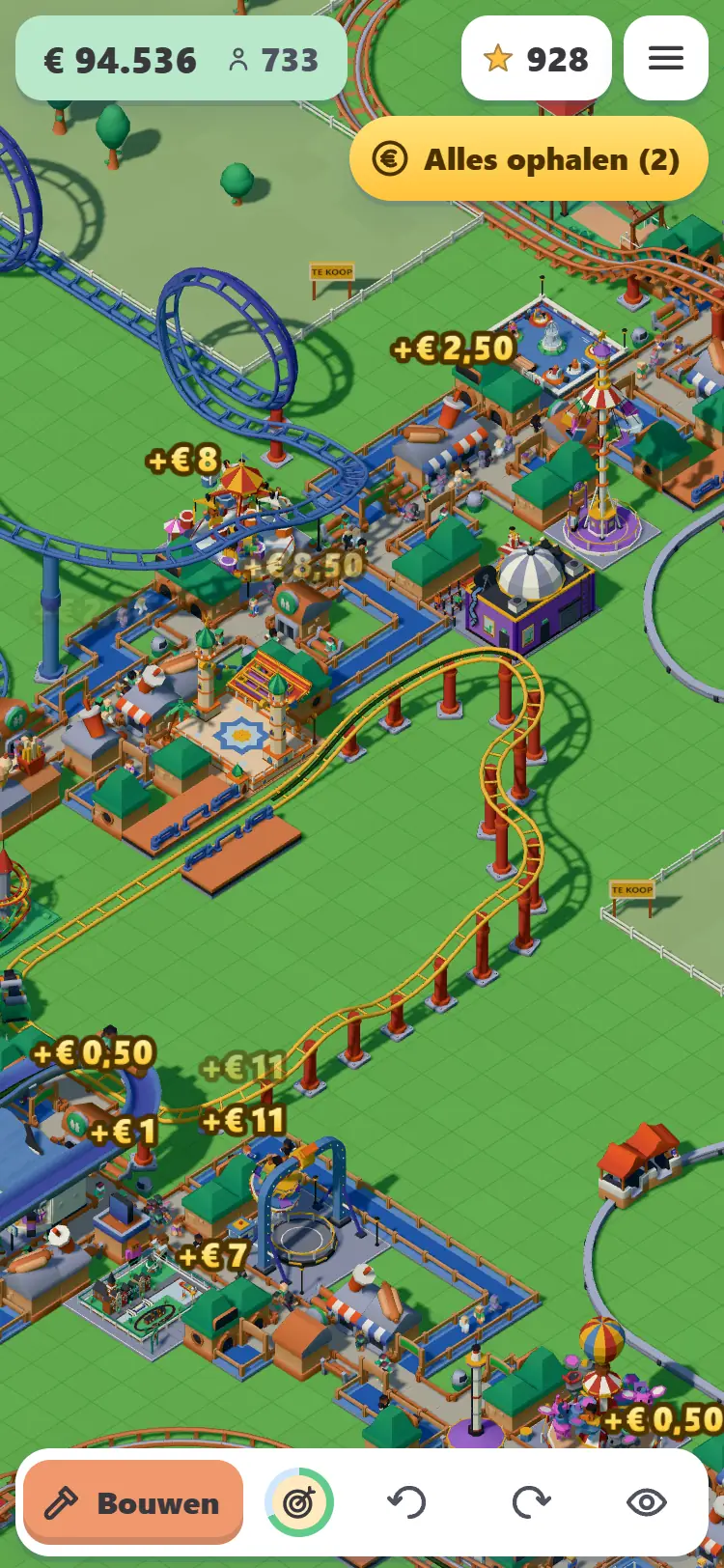
Open the game and choose Play for free. You’ll start straight away with your own park, without an account. You’ll play as a guest, and your park will be saved for seven days after you last play. To keep it for longer or continue on another device, create an account with your email address and a password. After you’ve played for a few minutes, the game will ask if you want to do this. You can also choose Save your park in the menu.
You start with a small amount of money and a plot of land. The first things you build are almost always the same: a path, a stall and a ride. Without a path, guests can’t go anywhere; without a stall, you won’t earn much; and without a ride, they have no reason to visit. The in-game goals guide you through the same order: first a short path, then a stall, then your first ride and then your first staff member.
When you place your first building, you get a free plot of land. Look for a FREE sign on the map and tap it to claim the land. Then you can start building a little further out.
Camera and controls
The park is shown from above at an angle. On a phone or tablet, drag with one finger to move the map, pinch with two fingers to zoom in and out, and rotate the park with two fingers. On a computer, drag the map with the mouse and zoom with the scroll wheel. The Q and E keys rotate the park. Press B to open the build menu, R to rotate the item you want to place, U to undo your last action, and Esc to stop building.
Everything you can do is in a few places: the build menu at the bottom (with tabs for Paths, Coasters, Rides, Stalls and Decor), the menu at the top, and the buttons for your goals, money and gems. Tap something in your park, such as a ride or stall, to open a window with its details and price.
Paths and queues
Guests only walk on paths. Choose the Paths tab in the build menu and select the Path tool. On a phone, tap a tile to start and drag from the yellow dot to extend the path; on a computer, click and drag. Each tile costs a small amount. Use Bulldoze to remove something: you get 30 per cent back for stalls and decor, but nothing for paths, so plan them carefully.
Every ride has an entrance and an exit. Connect the entrance to the path with a queue: the Queue tool creates a path where guests line up neatly. If the queue isn’t connected, the ride won’t get any guests. If the entrance is on the wrong side, switch the entrance and exit using the Swap entrance button when placing the ride.
A few habits will make your park more enjoyable:
- Lay a main path from the park entrance and connect rides to it like branches on a tree.
- Place stalls and toilets in busy areas, not hidden at the end of a dead-end path.
- Give guests a circular route to walk. A path with no way out can trap people.
- Use the No Entry sign to choose which side of a path guests can’t walk through. It’s useful for staff paths and back areas.
Rides and stalls
The Rides tab contains more than fifty smaller rides in groups: children’s rides, family rides, thrill rides, water rides, dark rides and shows, exploring, and play and sport. Choose a ride, tap where you want to place it, rotate it with the Rotate button and confirm. Then build its queue. The full list of rides shows what’s available and the level at which you unlock each one.
Aim for variety. A park with only carousels gets boring quickly; a mix of gentle children’s rides, a few family rides and a few thrilling rides attracts all kinds of guests. Also check the space available: some rides are large and won’t fit everywhere.
Under Stalls, choose what to sell to your guests: food, drinks, souvenirs and facilities such as toilets and an information kiosk. Guests get hungry and thirsty, and need to use the toilet. A chip stall sells best where lots of people pass by. You can raise or lower a stall’s price in its window: if it’s too expensive, guests won’t buy anything; if it’s too cheap, you miss out on money. The game suggests a starting price. Begin with that and adjust it once you see what works.
The Decor tab has trees, bushes, flowers, hedges, benches and bins. Decor is cheap and makes your park look better. Bins and benches along the paths also help: there’s less litter and guests can rest.
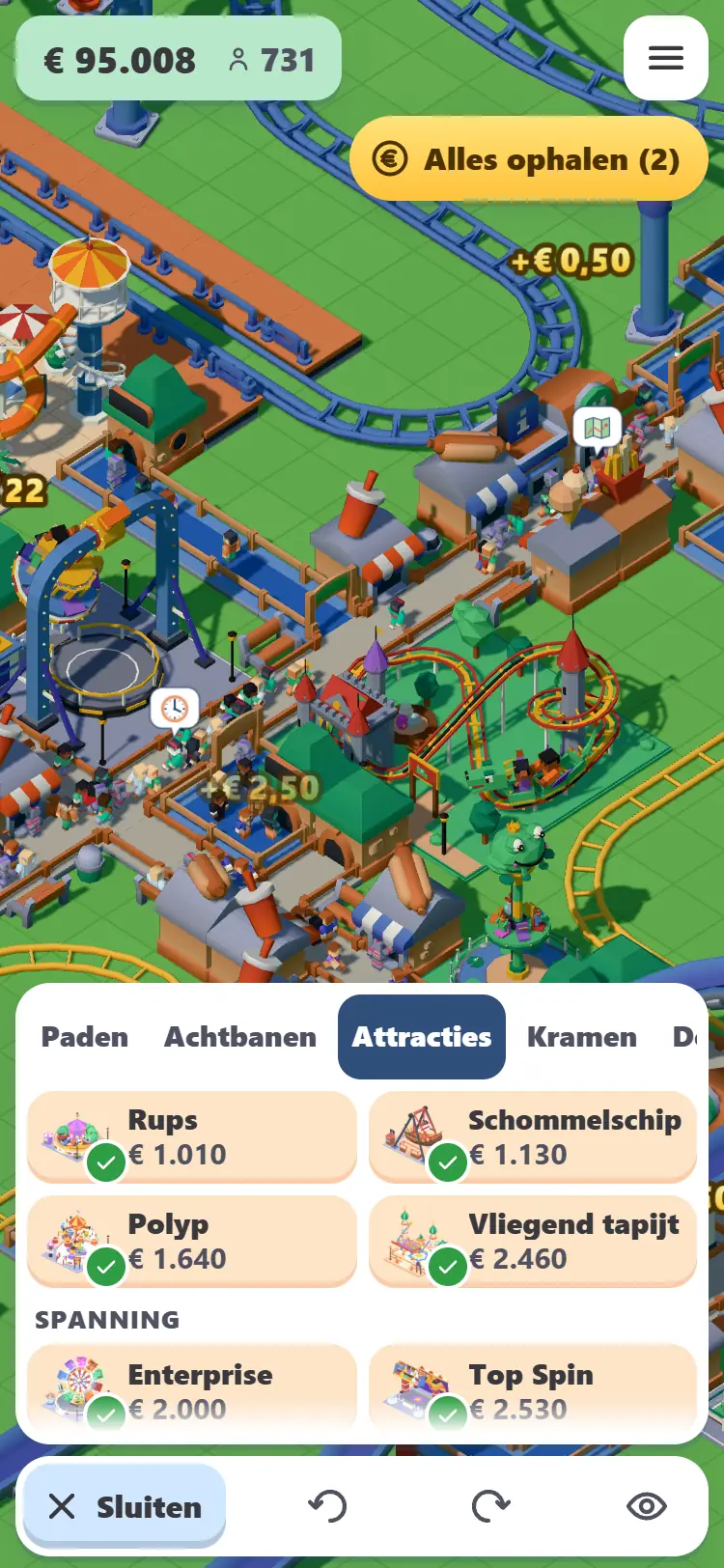
Building and testing coasters
The coaster is at the heart of the game. Choose the Coasters tab in the build menu and tap a type. There are sixteen types of coaster, each with its own character and level. You then have two options:
- Build a standard design. Place a ready-made track in one go. It’s ideal if you want a good coaster quickly or want to see how one is put together.
- Build your own. Lay the track piece by piece. This is the most fun part.
Step 1: The station
First tap where you want the station. Use Rotate to set its direction, and the buttons to make it shorter or longer to choose its length. A longer station means more cars in the train and more guests riding at the same time. A longer train also costs more, so start small.
Step 2: The track
A row of track pieces appears at the bottom: straight sections of four or one tile, turns, wide turns, climbs and drops, hills and dips, banked turns, and for some coaster types, loops, corkscrews or a launch piece. Tap a piece to see what it will look like, then tap again to build it. Each piece shows what it does and how much height it gains or loses. If a piece won’t fit, a short message appears on the map: Collision means something is in the way, No land means you don’t own that plot yet, Too expensive means you don’t have enough money, and Too slow means the train doesn’t have enough speed at that point.
That last part is the art of designing. A train gains speed on drops and loses it again on hills. A loop needs a lot of speed. So start your track with a lift hill (a chain lift that pulls the train up) and a big drop, then add loops and turns afterwards. If you get stuck, use Remove last piece. The Complete track button finds a route back to the station and shows you the cost before you confirm.
Step 3: Test and open
A track must form a circuit: the train has to return to the station. Once it’s complete, run a Test Run with an empty train. If it passes, the coaster gets ratings for excitement, intensity and nausea, as well as details such as its length, top speed, highest point, number of drops and inversions. If the test fails, the game tells you why, for example if the train gets stuck halfway. Adjust the track and try again.
Then press Open and set the ticket price in the ride window. The game suggests a price. Excitement attracts guests, but a ride that’s too wild or nauseating puts off cautious guests, who think: That one’s too wild for me. A good coaster combines high excitement with an intensity level that suits your guests.
Small coasters such as the Wild Mouse are cheap and great for beginners. Higher-level types cost more per track piece, but attract more guests and earn more money in return. A mechanic keeps your rides running: rides can break down and will stay closed until they’re repaired.
Keeping guests happy
Every guest has needs: hunger, thirst, a trip to the toilet, energy and a stomach that shouldn’t be jostled too much. Tap a guest to see what they’re thinking: I’m hungry, What a long queue, That’s far too expensive or I can’t find anything. These thoughts are your best guide. A hungry guest looks for a stall; if they can’t find one, they’ll leave.
Your park rating sums up how well you’re doing. It’s based on things such as happiness, cleanliness and variety in your rides. A higher rating attracts more guests. That’s also why cleaning up litter and offering a good mix of rides pays off. The Finances window shows what you earn and spend in each category, and your net income per minute. A negative number means your park costs more than it earns: check which ride or stall isn’t bringing in enough.
Want more guests for a while? An advertising campaign (leaflets, and later radio and television) brings extra people to your park for a while. It’s especially useful when you’ve just opened a big new ride.
Buying land
Your park starts small, but you can buy more land from the beginning. Plots for sale have a FOR SALE sign. Tap one to see its size and price, then confirm the purchase. You can only buy land next to your park, so you’ll expand outwards. Plots at the edge of the map cost more.
You need land for large coasters, which can quickly cover several plots. If a track piece is on land you don’t own, you’ll see No land. Buy the plot before planning a track that crosses it.
Staff
Once your park is up and running, you’ll need some help. There are four types of staff:
- Cleaner. Sweeps litter from paths and empties bins. Without a cleaner, your park will soon get dirty.
- Mechanic. Inspects rides and repairs them when they break down. They’re essential once you have more than a few rides.
- Security guard. Patrols the park; nearby guests are less likely to drop litter. Unlocked as you progress.
- Entertainer. Walks around and entertains nearby guests. Choose their costume, such as a clown, magician, pirate or princess.
Staff cost a hiring fee and then wages per minute. They automatically walk their routes along the paths. Don’t hire too many too soon: check the staff window to see what they’ve done, and hire more if litter starts piling up or rides stay closed for too long.
Goals and levels
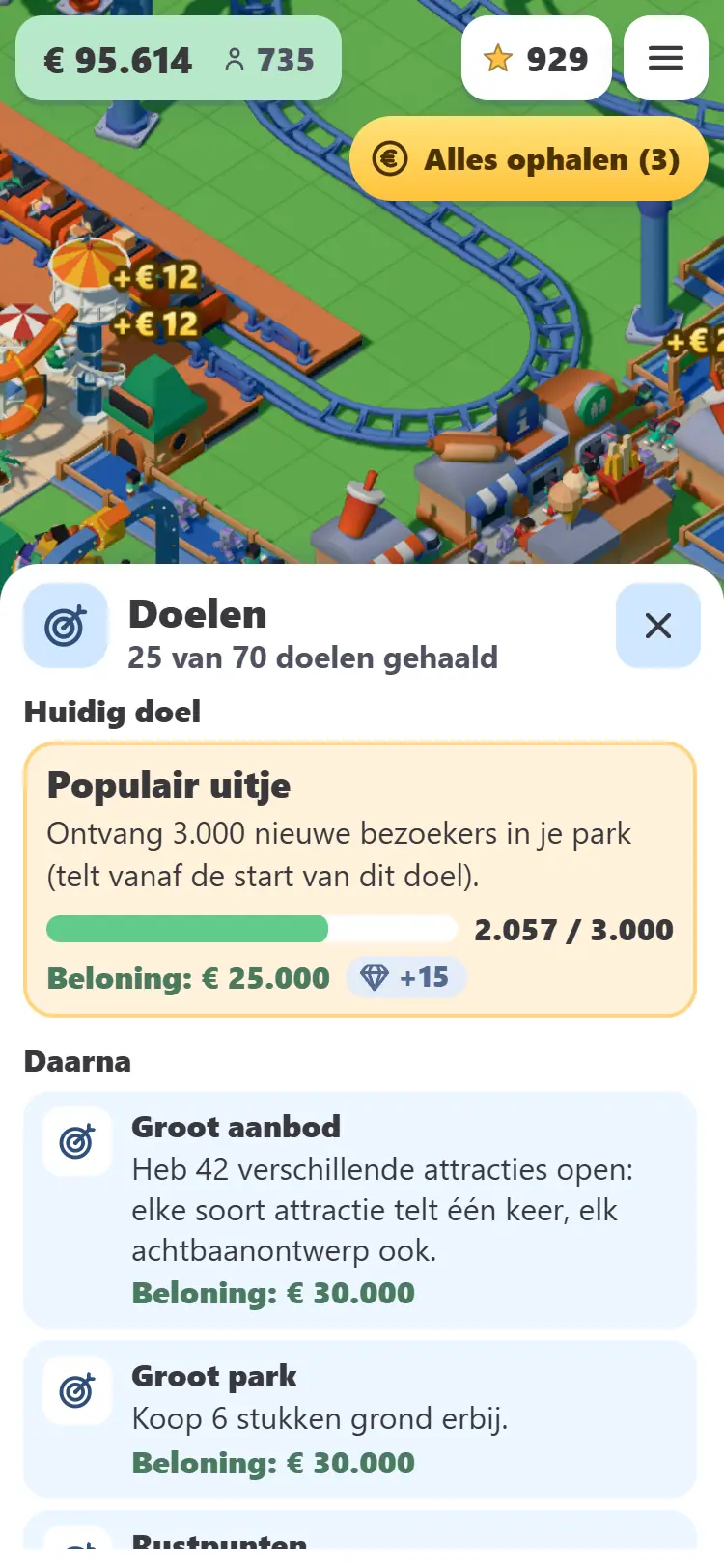
The game has a long series of goals. They start simply (lay a few paths, build a stall) and get bigger over time: reach a certain number of guests, get a higher park rating, earn a certain amount or build a number of rides. Each goal gives you a reward in money and sometimes gems, a new ride or a new feature. When you complete a goal, it says Done! Claim your reward with Collect.
Some goals take you to a higher level. There are five levels. Each one unlocks rides, coasters, stalls, decor and staff that were previously locked. A card that isn’t available yet shows which level unlocks it. The goals screen shows how many goals you need to complete for the next level. See what each level unlocks in the All Levels overview.
Events and weekly activities
The game runs events around holidays, such as Spooky Week around Halloween and St Nicholas in the Park around St Nicholas Day. During an event, you get a short series of tasks and can earn special rides and decor that are only available then. Between events, there are weekly activities lasting a few days: complete three steps in a row to earn gems, money and a special item. Dates are shown on the home page and in the game. Start in time, because you can’t earn the reward after the event ends.
Gems
Gems are the game’s second currency. You can earn them for free: from a starting bonus, a daily reward (come back seven days in a row for the biggest reward on day seven; miss a day and the streak starts again), and rewards for certain goals and weekly activities. Use gems to unlock special stalls and move things around in your park. You only need to unlock a special stall once with gems; after that, you can build it as often as you like with regular cash.
Saving and continuing
Your park is saved automatically. With an account, it’s online and you can sign in on any device. Your park also keeps earning while you’re away, at a slower rate than when you’re playing and up to a limit of a few hours. When you return, Welcome back shows what you’ve earned. If you leave the game open without doing anything, it will ask Are you still there? after a few minutes, then your park will continue quietly in the background.
Want to start over? Choose this in the menu. You can either clear your park (keeping your money, land and level) or start completely from scratch.
Tips for a busy park
- Build your first ride close to the entrance, with a stall and toilet nearby.
- Collect each reward as soon as you complete a goal. It’s usually just enough for your next purchase.
- Combine gentle and thrilling rides. Children and grandparents visit too.
- Keep queues short. A long queue may mean you need a second ride or a longer train.
- Test every new coaster and check its intensity. Guests will avoid a ride that’s too wild.
- Hire a cleaner and a mechanic before the park gets too busy, not afterwards.
- Buy land before planning a large track across it.
- Check Finances regularly: what earns a lot, and what is just costing you money?
- Drop by every day for the daily reward and the current weekly activity.
- Playing on a phone that feels slow? Turn on Low quality in the menu.
Can’t find your question here? Check the Frequently Asked Questions.
Now you know how it works: start building.
Play for free